
Halloween is here! From today's server save till server save November 3, the Mutated Pumpkin will rear its ugly head west of Darashia to instill fright and dread in the hearts of many an adventurer.
Every player daring to step up to the Mutated Pumpkin will be rewarded according to their level of participation. Once you have bested the fiend, you can claim your rightful loot from its cold, dead body.
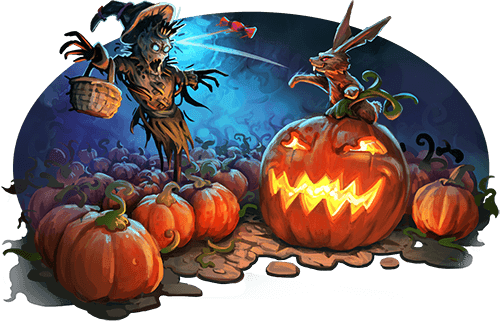
Moreover, every Tibian hero who took part in the fight against the pumpkin will be worthy enough to pass the portal to skin its corpse with the obsidian knife for a second reward.
Be on the lookout for the infamous Halloween Hare if you want to become a harrowing beast. Hurry up, since the Halloween Hare hides itself somewhere on mainland, on Rookgaard, and on Dawnport and can only be found on October 31.
We wish you all a spooky Halloween!
Your Community Managers
Work smarter, not harder - even when you're fighting dragons.
– A Very Efficient Knight
With the upcoming update, two new quality-of-life features will make your action bar even more powerful and intuitive.
Improved Object Targeting
This feature streamlines how you interact with objects and runes through your action bar.
A new option, “Use at cursor position,” lets you apply an object directly to whatever is beneath your mouse cursor in the game window when pressing the hotkey. This reduces the number of required clicks from two to one. The option can be selected while dragging the object in the action bar.
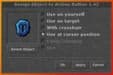
If your cursor is positioned outside the game window, the action will not be executed and you will receive a short message. Otherwise, the behaviour remains consistent with existing mechanics: for example, if an item, such as a rope, can only be used on adjacent tiles, your character will still move to a valid field before performing the action.
The new targeting option can also be used within the Battle List, providing greater comfort and flexibility for all playstyles.
Multiaction Button
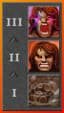
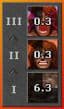
To make spell rotations and item usage even smoother, you can now combine up to three actions into a single action bar button.
Right-click any action bar button and select "Assign Multiaction" to open a small interface consisting of three slots. You can drag spells or objects into these slots just like you would with regular action bar buttons.
When activated, the button will automatically execute the first available action that is not on cooldown. The button's icon dynamically adapts to the next action that would be executed.
Example uses:
These improvements aim to enhance your comfort, precision, and control, letting you focus on what truly matters: the fight ahead.
Streamlined killing,
Your Community Managers
Upcoming next: A Hunter's Delight
| Content Teaser 2/2 | Feature Teaser 2/4 |
Dear Tibians!
With today's server save, we have implemented the following fixes and changes:
Changes to the Dialogue Interface and Newhaven:
Added three new buttons to the Dialogue Interface: Yes, No, and Bye.
You can now engage NPCs with the same clicks normally used to attack enemies with regular and classic control.
The NPC chat channel tab no longer opens automatically and is no longer highlighted by new messages. It now primarily serves as a chat history.
When leaving an NPC dialogue, the previous chat mode is restored.
We have fixed an issue that caused account-wide outfits and mounts to become unavailable after transitioning from Dawnport to Newhaven.
Happy hunting,
Your Community Managers
