

Your Tibia account is a treasure worth protecting! To help you guard your account more effectively and recover it swiftly if needed, we will add various improvements to account security and recovery with the server save tomorrow, July 07.
Please take a moment to read through the details below so you are ready to strengthen your account's defences tomorrow after server save before you head out on your next Tibian adventure.
Secondary Email Address
If you have confirmed your account and received your initial recovery key, you will be able to add a secondary email address in your account management under General Information via the "Manage Emails" button. You need to confirm the setup via a link sent to your primary email address.
With a secondary email address you can request a new recovery key to be sent to this email address. Like every vigilant Tibian knows, the recovery key is a very important security feature so we recommend you to set up a secondary email address for your account, preferably from a different provider than your primary email address.
For your secondary email address, you cannot use an email address that is already assigned to another Tibia account. Also, it may not be based on your primary email address. Variations of the same email address (e.g. using '+' aliases) are not allowed.
You will also be able to swap your primary and secondary email by entering your password. Note that there is a 30-day waiting period before the change takes effect.
Additional Recovery Methods
If you need a new recovery key, you will be able to request it via SMS or via your secondary email address, provided you have added the corresponding contact information to your account. Both services are free of charge, and you will receive a confirmation code for a new recovery key. Certain limits apply as to how often you can request a code per day and month.
Important Info on Recovery Key Letters: So far, confirmation codes for obtaining a new recovery key have been sent exclusively by postal mail. However, postal delivery can be unreliable due to different address formats, for example, and it may also take quite some time. Therefore, the option of ordering recovery letters will be discontinued at a later date. |
Trusted Devices
When you log in to the website or the client using two-factor authentication, a checkbox will allow you to trust the device you are logging in from to skip your two-factor authentication for the next 30 days. If the checkbox is ticked and you log in successfully, this device will be saved as a trusted device. We strongly recommend to only use this option on devices that you truly trust.
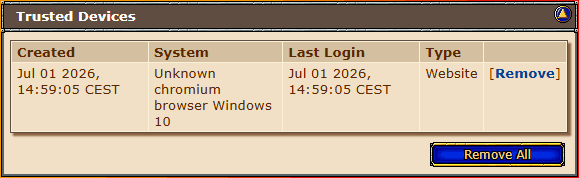
You can remove a trusted device via your account management. If you change your two-factor authentication or your password, all trusted devices will be removed automatically.
Unknown Device Login Notifications
If someone successfully logs in to an account from an unknown device, an email will be sent to the registered primary email address. This email will show parts of the IP address used for the login and the country associated with this IP address. A device is considered unknown if its IP address has not been used to log in within the last 14 days or if it has not been marked as a trusted device.
The following passage will be added to the Privacy Policy as point 15:
CipSoft also processes IP addresses to ensure account and platform security, in particular to detect unusual login attempts, prevent unauthorized access and protect user accounts from misuse. For this purpose, login-related data such as the IP address and derived location information may be evaluated and, where appropriate, used to inform the account holder about suspicious login activity. This processing is carried out to safeguard the integrity of our services and user accounts and is based on CipSoft’s legitimate interest pursuant to Art. 6 para. 1 lit. f GDPR.
Login Confirmation
Accounts that have been inactive without a login for 12 months or longer and do not have two-factor authentication enabled will require a login confirmation code after the correct password has been entered. You can choose whether this code will be sent to the account's primary email address or, if you have added a secondary email address or mobile phone number to your account, to one of these options instead.
Storage of Address Data
In the past, your address data was needed for account recovery. The purpose of processing address data will change, though, and the entry of your name and address will be optional. Address data may still help in individual cases when you contact our customer support to verify your identity, for example. It is not used for any other purpose. Naturally, the data remains secure. You can manage this data yourself at any time in your account management.
The following information will be added to point 1 of the Privacy Policy:
If players choose to voluntarily enter their full name and postal address, this information will be used exclusively to support account-related inquiries where identity verification is required. The data is stored securely and can be deleted by the user at any time. These data were previously used for postal recovery procedures.
Miscellaneous
Additional small improvements include:
- The section for entering your mobile phone number will be more prominent.
- The page for generating a new recovery key can no longer be closed without a warning.
- You will be able to delete your registration data. The same restrictions and measures apply as when changing your registration data.
Account Security Wizard
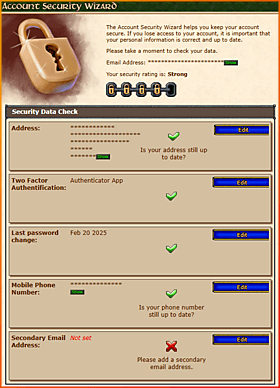
Last but not least, the new Account Security Wizard will help you review and improve your account security. It provides an overview of important account recovery and protection settings and assigns a security rating based on them. Will you be able to reach the highest rating very strong?
The Account Security Wizard page will be shown the first time you log in to your account management on the website, provided your account is at least 3 days old. Afterwards, it will be shown once every 12 months. You can also open it manually via your account management at any time.
Keeping your account information up-to-date and accurate is important to ensure that you can recover your account if you ever lose access to it.
Protect your account!
Your Community Managers